How to use an allergy card when eating out
Food made to order in a restaurant isn't labeled like packaged food, so the kitchen is your only source of information. An allergy card puts your allergens, diets and how strict you need to be in writing. Share it when you book, hand it to your server when you order, and ask them to show it to the kitchen.
Why restaurants are different
US allergen labeling law is built around packaged food. According to the FDA, it doesn't apply to food that's wrapped or boxed after you order it, and most restaurant food that isn't pre-packaged with a label is outside it. There's no ingredient list to read, so you have to ask, and the answer depends on the person you ask understanding exactly what you need.
What to put on the card
- Every allergen you avoid, in plain words.
- How strict you need to be: is a trace from shared equipment a problem?
- Diets such as vegetarian, halal or kosher, if they apply.
- Other ingredients you avoid that aren't common allergens.
How to use it
- Before you go: send the card when you book, or call ahead and ask whether they can cater for you.
- When you order: hand the card to your server and ask them to show it to the kitchen.
- Ask about preparation: shared fryers, grills, sauces made in advance and garnishes are common sources of cross-contact.
- Confirm when the food arrives. If you're unsure, don't eat it.
Be ready anyway
The FDA's advice for anyone with a food allergy includes learning to recognize the early symptoms of a reaction and knowing what to do if one happens, including having ready access to treatment. Carry any medication your doctor has prescribed.
Creating a card in SafeScan
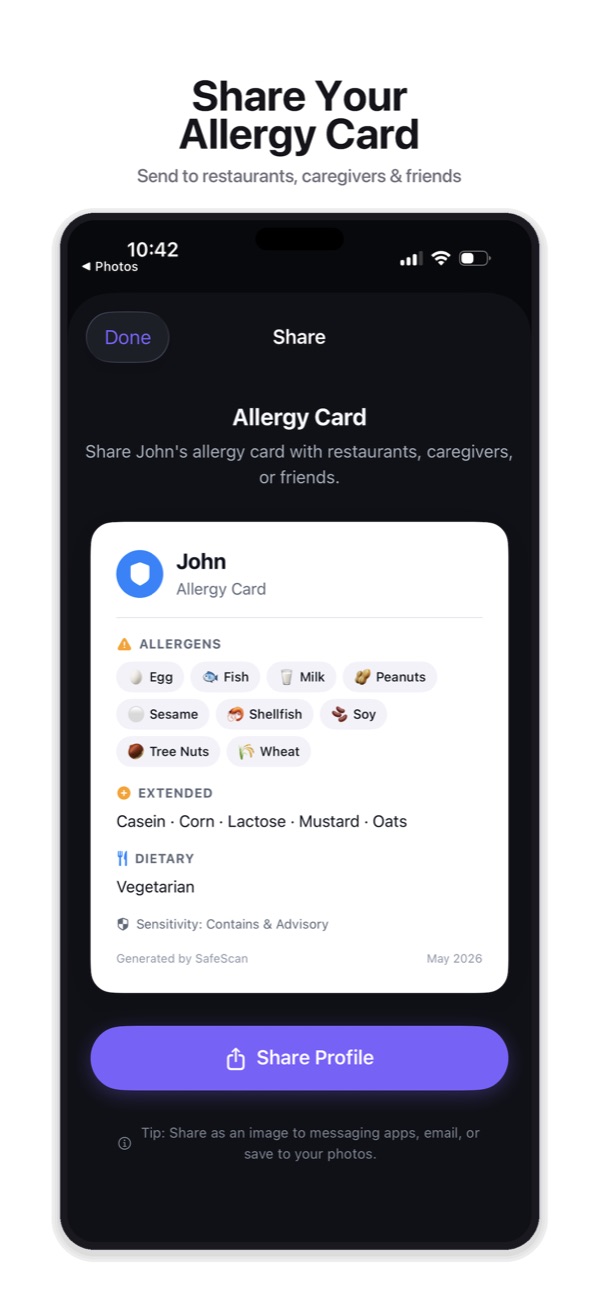
Open Profiles, pick a profile and tap Share Profile. The card lists allergens, extended allergens, diets and sensitivity mode. Make one for each family member. More about the allergy card.
This guide is general information based on US labeling rules, not medical advice. Talk to your doctor or allergist about your own allergies, and always read the label on the package in your hand.
Make an allergy card in seconds
SafeScan turns any profile into a clear allergy card with allergens, extended allergens, diets and sensitivity mode. Share it as an image by text or email, or save it to your photos to show at the table.
Download on the App StoreFree to download for iPhone and iPad. No account needed, and your profiles and scan history stay on your device.
Frequently asked questions
Do restaurants have to label allergens?
Not in the way packaged foods do. The FDA says allergen labeling rules don't apply to food placed in a wrapper or container after a customer orders it, and most food sold at restaurants that isn't pre-packaged with a label is outside the law. Ask staff.
Should the card say how severe my allergy is?
Yes. Say whether you need to avoid cross-contact, such as shared fryers, cutting boards or utensils, not just the ingredient.
Can I use a SafeScan card offline?
Yes. Save the card to your photos and you can show it without a connection.