Barcode and ingredient label scanner
Point your camera at a barcode and SafeScan looks the product up and checks every ingredient against your profile. No barcode, or the product isn't in the database? Photograph the ingredient label and SafeScan reads it with OCR, including "may contain" warnings and facility statements.
Download on the App Store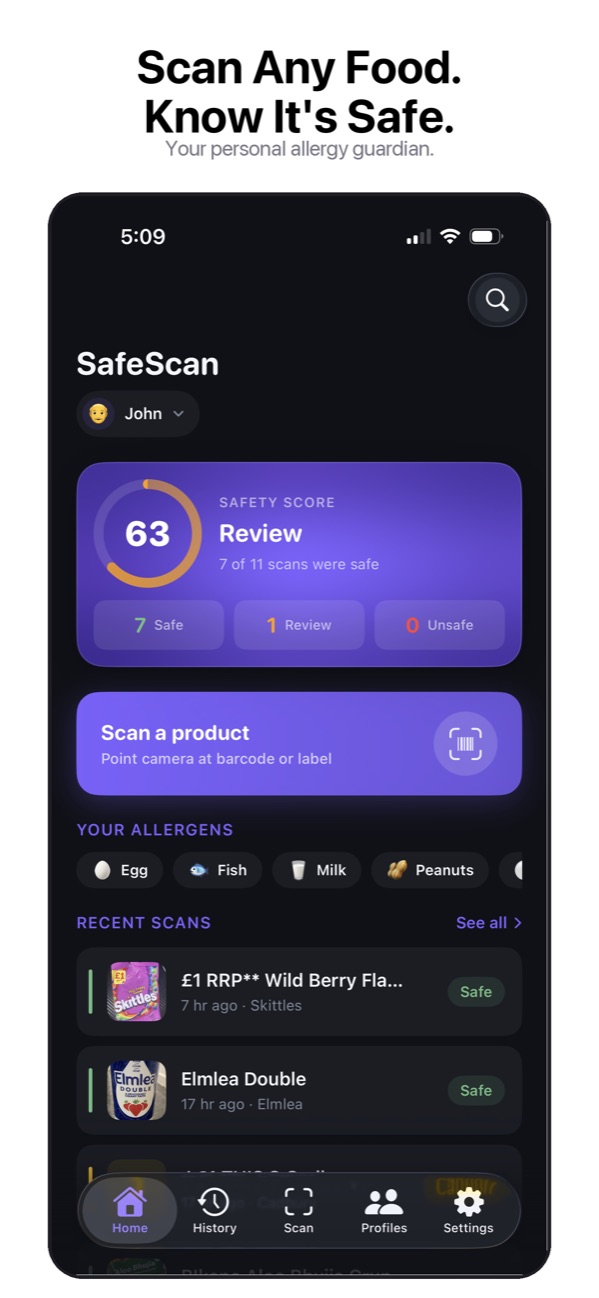
Three ways to check a product
- Barcode scanner. Point your camera at the barcode. SafeScan reads it, looks the product up and checks every ingredient against your allergy profile in real time.
- Label scanner. No barcode, or a product the database doesn’t know? Photograph the ingredient list. SafeScan reads the text with OCR and separates the ingredients from the “Contains” statement, “may contain” warnings and facility statements, because each one means something different.
- Manual entry. Type or paste an ingredient list, for example from a manufacturer’s website.
Why the label scan matters
A barcode lookup is only as good as the database entry behind it, and recipes change. The FDA notes that a product’s ingredients can change at any time and recommends checking the label every time you buy it. Scanning the label in your hand checks the version you’re actually holding.
What you get back
Every scan ends in one of four verdicts: Safe, Caution, Review or Unsafe. Flagged ingredients come with an explanation of why they matched and where on the label they appeared, so you can check it yourself. SafeScan is not medical advice. Always verify the label.
Frequently asked questions
Where does SafeScan get product data?
Barcode lookups use the open Open Food Facts database. Product data comes from that community database and may occasionally be inaccurate or outdated, so you can also scan the label on the package for a more accurate result.
What if the barcode isn't found?
Capture the ingredient label with your camera and SafeScan reads the ingredients with OCR and runs the same safety check. You can also type or paste an ingredient list, or enter a barcode number manually.
Do I need an internet connection to scan?
Looking up a new barcode needs a connection. Products you've scanned before are cached on your device and can be checked again offline.
More SafeScan features
Allergy profiles
Build an allergy profile in SafeScan with the 9 major US allergens, 11 extended allergens, 6 diets and a custom avoid list. Every scan is checked against it.
Family profiles
Create an allergy profile for each family member in SafeScan, then scan once and get a separate verdict for everyone. Built for parents and caregivers.
Scan history and favorites
SafeScan keeps every product you scan, grouped by date with its verdict. Filter by Safe, Not Safe or Needs Review, favorite trusted products and add notes.
Shareable allergy card
Turn any SafeScan profile into an allergy card listing allergens, diets and sensitivity, and send it to restaurants, schools, caregivers or friends.
Sensitivity modes
Choose Contains Only, Contains & Advisory or Strict in SafeScan to decide whether "may contain" warnings and unknown ingredients get flagged.
Dietary restrictions
SafeScan checks food for vegan, vegetarian, halal, kosher, low FODMAP and low histamine diets alongside your allergies, and explains every ingredient it flags.
Hidden allergen detection
Whey is milk, albumin is egg and tahini is sesame. SafeScan's allergen dictionary maps more than 1,000 ingredient names to the allergens they come from.
Product search
Search food products by name or brand in SafeScan and see a safety verdict for your allergy profile before you go to the store, without scanning anything.
Product compare
Compare up to 4 food products side by side in SafeScan. See each verdict, flagged ingredients and warnings, and which is safer for your profile.