SafeScan vs Fig
Fig: Food Scanner & Recipes covers a huge range of diets (it lists 2,800+ options), suggests foods at grocery stores and restaurants, and has thousands of ratings. SafeScan focuses on checking packaged food against allergies and diets, reads ingredient labels when a barcode isn't found, and its privacy label is Data Not Collected, while Fig's lists location as used to track you. Choose Fig for niche diets and discovery; choose SafeScan for private, family label checks.
We make SafeScan, so we're not neutral. Every fact about Fig below comes from its US App Store listing or official website, linked under Sources. How we compare apps.
At a glance
| SafeScan | Fig | |
|---|---|---|
| Price | Free download; optional SafeScan Pro (monthly or yearly) | Free download; Fig+ listed from $5.99/month, other plans from $34.99 to $69.99 |
| App Store rating | New app, not enough ratings yet | 4.7 from 16.5K ratings |
| Privacy label | Data Not Collected | Data used to track you: location. Data linked to you includes contact info, identifiers and usage data |
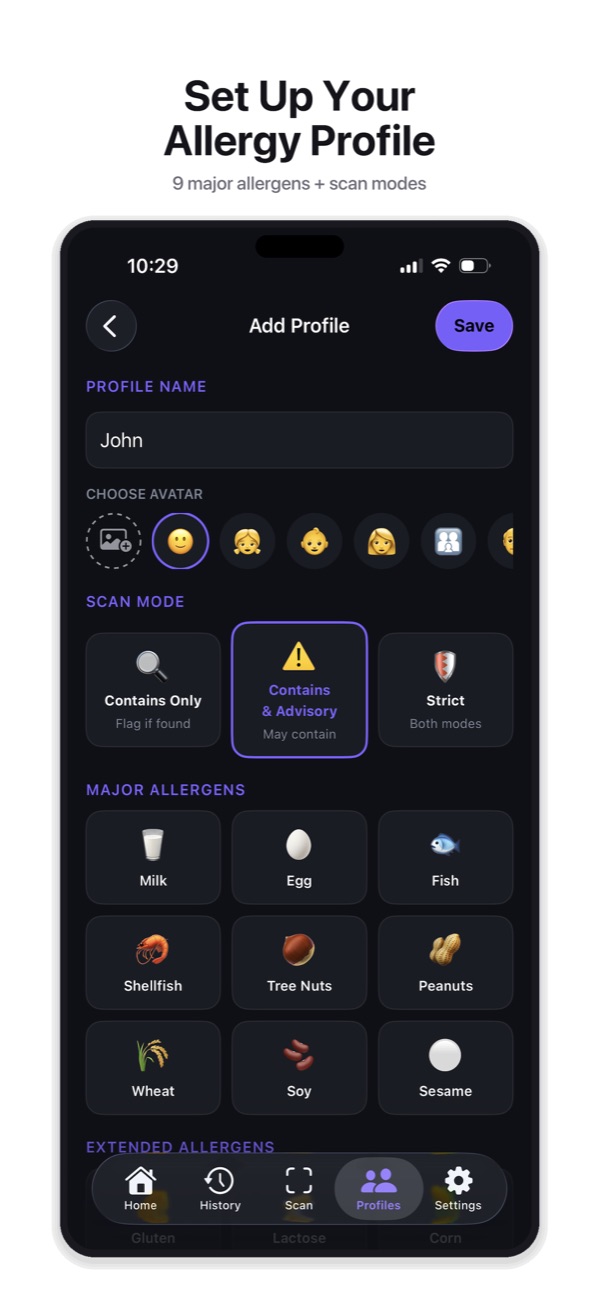
| Allergens and diets | 9 major + 11 extended allergens, 6 diets, custom avoid list | Every allergy and 2,800+ dietary options, per its description |
| Profiles for several people | Yes, with Scan for All (more profiles with Pro) | Yes |
| "May contain" handling | 3 sensitivity modes you choose per profile | Not listed in the description |
| Ingredient label scanning (OCR) | Yes, when a barcode isn't found | Not listed in the description |
| Store and restaurant suggestions | No | Yes, at 100+ grocery stores and restaurants |
| Download size | 7.7 MB | 240.8 MB |
| Requires | iOS 18.6 or later | iOS 16.4 or later |
Prices, ratings and privacy labels as shown on the US App Store in October 2026. Privacy labels are reported by each developer and not verified by Apple. Check the listing before deciding, as they change.
Where Fig is stronger
Fig has been around longer, has more than 16,000 ratings and says it has over a million members. Its biggest strength is breadth: it lists more than 2,800 dietary options, including specialized ones like Alpha-Gal, and its database is backed by ingredient ratings from its team of dietitians. It also helps you discover foods you can eat at more than 100 grocery stores and restaurants, and builds shopping lists. SafeScan doesn’t do discovery or restaurants.
Where SafeScan is stronger
- Privacy you can check. SafeScan’s App Store privacy label is Data Not Collected. No account is needed and profiles stay on your device. Fig’s label lists location as used to track you.
- Reads the label in your hand. When a barcode isn’t in the database, SafeScan photographs the ingredient list and checks it, including “may contain” and facility statements.
- You choose how strict. Three sensitivity modes decide whether advisory warnings and unknown ingredients count, set per family member.
- Small and fast. A 7.7 MB download versus 240.8 MB.
The bottom line
If your diet is unusual or you want an app that tells you what you can buy and where, Fig is the broader tool. If you want a private, focused check of the products in your basket for everyone in the family, SafeScan does that without collecting your data.
Try SafeScan free
Set up an allergy profile in under a minute, scan a barcode or ingredient label, and get a Safe, Caution, Review or Unsafe verdict with the reason. No account, no tracking, and your profiles stay on your iPhone.
Download on the App StoreFree to download for iPhone and iPad. No account needed, and your profiles and scan history stay on your device.
Frequently asked questions
Is SafeScan a good alternative to Fig?
If you mainly need to check packaged food against allergies and common diets for your family, yes, and its privacy label is Data Not Collected. If you follow a very specific diet or want suggestions for what to buy and where to eat, Fig covers more.
Does Fig track you?
Fig's App Store privacy label, which is provided by the developer, lists location under "Data Used to Track You". SafeScan's label is Data Not Collected.
Which app is cheaper?
Both are free to download with optional subscriptions. Fig lists Fig+ from $5.99 a month in the US. Check each App Store page for current prices.