Best food allergy apps for iPhone (2026)
For checking packaged food against several allergies with nothing leaving your phone, SafeScan. For a huge range of diets plus restaurant and grocery suggestions, Fig. For allergy-friendly restaurant reviews from other families, Spokin. For a free, non-profit database, Open Food Facts. For celiac disease only, Gluten Free Scanner. Nosher mixes allergies with wider health and eco ratings.
We make SafeScan, so we're not neutral. Every fact about another app comes from its US App Store listing in October 2026, linked under Sources. How we compare apps.
At a glance
| App | Best for | Price (US) | Privacy label |
|---|---|---|---|
| SafeScan | Checking packaged food against several allergies and diets, privately | Free; optional Pro (monthly or yearly) | Data Not Collected |
| Fig | Very specific diets, plus grocery and restaurant suggestions | Free; Fig+ listed from $5.99/month | Tracks location |
| Spokin | Allergy-friendly restaurant and product reviews | Free; no in-app purchases listed | Collects data linked to you; no tracking |
| Nosher | Allergies plus health, eco and pregnancy categories | Free; weekly, yearly and lifetime plans listed | Tracks identifiers |
| Open Food Facts | A free, non-profit, collaborative database | Free | Data not linked to you |
| Gluten Free Scanner | Celiac disease and gluten only | Free; Premium $1.99/month or $19.99/year | Tracks identifiers and usage data |
1. SafeScan: best for private, multi-allergy label checks
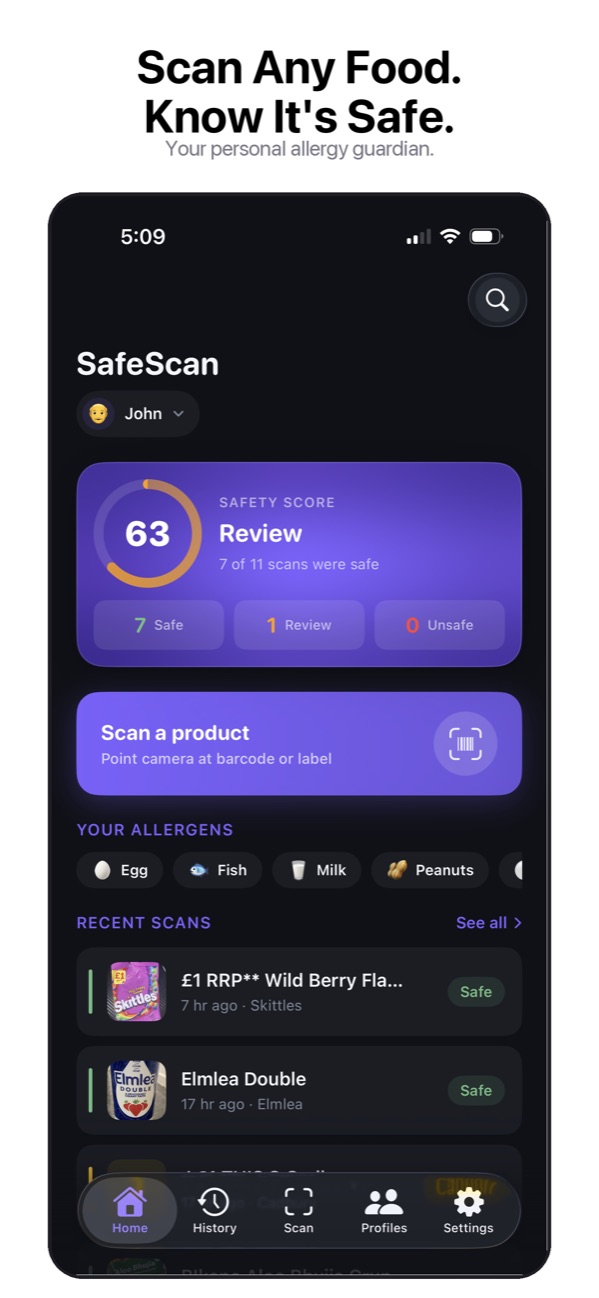
SafeScan checks packaged food against the 9 major allergens, 11 extended allergens, 6 diets (including halal and kosher) and a custom avoid list. Scan a barcode, or photograph the ingredient label when the barcode isn't found, and get a Safe, Caution, Review or Unsafe verdict with the reason. Family profiles and Scan for All give each person their own verdict, and three sensitivity modes control how "may contain" warnings are treated. No account is needed, and the privacy label is Data Not Collected. It's a new app without many ratings yet, and it's English-only. See all features.
2. Fig: best for unusual diets
Fig says it supports more than 2,800 dietary options, including Low FODMAP, Alpha-Gal and Low Histamine, with profiles for several people and suggestions at more than 100 grocery stores and restaurants. It has 4.7 stars from over 16,000 ratings. Its privacy label lists location as data used to track you. SafeScan vs Fig.
3. Spokin: best for eating out
Spokin focuses on reviews from people with the same allergies: restaurants, hotels, allergists, recipes and products, plus a hidden allergen feature. It's free with no in-app purchases listed. SafeScan vs Spokin.
4. Nosher: allergies plus wider health ratings
Nosher combines allergy checks with categories for health, environment, vegan living, pregnancy and E numbers, and includes family profiles and product comparison. Its listing shows weekly, yearly and lifetime plans. SafeScan vs Nosher.
5. Open Food Facts: best free database
The non-profit "Wikipedia of food" lets you set food preferences, including allergens, and contribute missing products. It's free and available in many languages. SafeScan uses Open Food Facts data for barcode lookups. SafeScan vs Open Food Facts.
6. Gluten Free Scanner: best for celiac disease only
A focused scanner for one question: does this contain gluten? It has 4.9 stars from over 11,000 ratings and an offline database with Premium. If gluten is your only concern, it's a strong choice; if you manage several allergies, you'll want a multi-allergen app.
What about Yuka?
Yuka is one of the most popular food scanners, with 4.8 stars from over 100,000 ratings, but it scores products on nutrition, additives and organic status. Allergen checking isn't mentioned in its App Store description. SafeScan vs Yuka.
How to choose
- Several allergies or a family to shop for: pick an app with per-person profiles and per-person results.
- Privacy matters: read the App Store privacy label. Allergy data is health data.
- Products often missing: make sure the app can read an ingredient label, not just a barcode.
- "May contain" matters to you: check whether the app lets you choose how advisory labels are treated.
This guide is general information based on US labeling rules, not medical advice. Talk to your doctor or allergist about your own allergies, and always read the label on the package in your hand.
Try SafeScan free
Scan a barcode or ingredient label and SafeScan checks it against everyone in your family, with a Safe, Caution, Review or Unsafe verdict and the reason. No account, and the App Store privacy label is Data Not Collected.
Download on the App StoreFree to download for iPhone and iPad. No account needed, and your profiles and scan history stay on your device.
Frequently asked questions
Can an app tell me if a food is safe to eat?
No app can guarantee that. Allergy apps check ingredient data against your profile, and that data can be incomplete or out of date. Use an app to speed up the check, then read the label on the package.
Which food allergy app is the most private?
Check the App Store privacy label on each listing. SafeScan's label is Data Not Collected. Fig, Nosher and Gluten Free Scanner list data used to track you; Spokin, Open Food Facts and Yuka list data collected but no tracking.
Is Yuka good for food allergies?
Yuka rates products on nutrition, additives and whether they're organic. Allergen checking isn't mentioned in its App Store description, so it's better suited to general healthy eating than to managing an allergy.
Sources
- SafeScan: Food Allergy Scanner on the App Store
- Fig: Food Scanner & Recipes on the App Store
- Spokin - Manage Food Allergies on the App Store
- Allergy & Food Scanner: Nosher on the App Store
- Open Food Facts - Product Scan on the App Store
- Gluten Free Scanner on the App Store
- Yuka - Food & Cosmetic Scanner on the App Store